Plain files in git
No proprietary export format. Requests are shell scripts you can diff, review, and grep. Environments are .env files; secrets stay in a gitignored .env.local.

Sankh is a very lightweight request manager. A collection is a plain folder of .sh files, each holding one curl command. One binary runs them in CI or serves a small
web UI.
curl -fsSL https://sankh.dev/install.sh | sh #!/usr/bin/env bash
# @name Create pet
# @tags smoke
# @expect status 201
# @expect json .name == "Rex"
# @capture PET_ID=.id
curl -sS "$BASE_URL/pets" \
-H "Authorization: Bearer $TOKEN" \
-H 'Content-Type: application/json' \
-d '{"name":"Rex"}'Annotations live in shell comments, so every file still runs on its own, with or without Sankh. Your API collection is a git repo that runs anywhere. The UI is optional.
my-api/
  sankh.toml
  environments/
    dev.env
    ci.env
  auth/01-login.sh
  pets/01-list.sh
pets/02-create.shset -a; . environments/dev.env; set +a
sh pets/02-create.sh$ sankh run examples/petstore --env dev
sankh · petstore · env dev (6 requests)
✓ Log in 200 38ms auth/01-login.sh
captured TOKEN=***
✓ List pets 200 6ms pets/01-list.sh
✓ Create pet 201 7ms pets/02-create.sh
captured PET_ID=1
✓ Get pet 200 5ms pets/03-get.sh
✓ Delete pet 204 5ms pets/04-delete.sh
✓ Deleted pet is gone 404 4ms pets/05-get-deleted.sh
6 passed 72msNo proprietary export format. Requests are shell scripts you can diff, review, and grep. Environments are .env files; secrets stay in a gitignored .env.local.
sankh run filters by folder and tag, writes JUnit or JSON reports, and exits
non-zero on failure. Values captured from one response feed the next request.
sankh serve opens a file tree, form and raw editors, and live results. The server
runs the requests, not the browser, so there are no CORS workarounds.
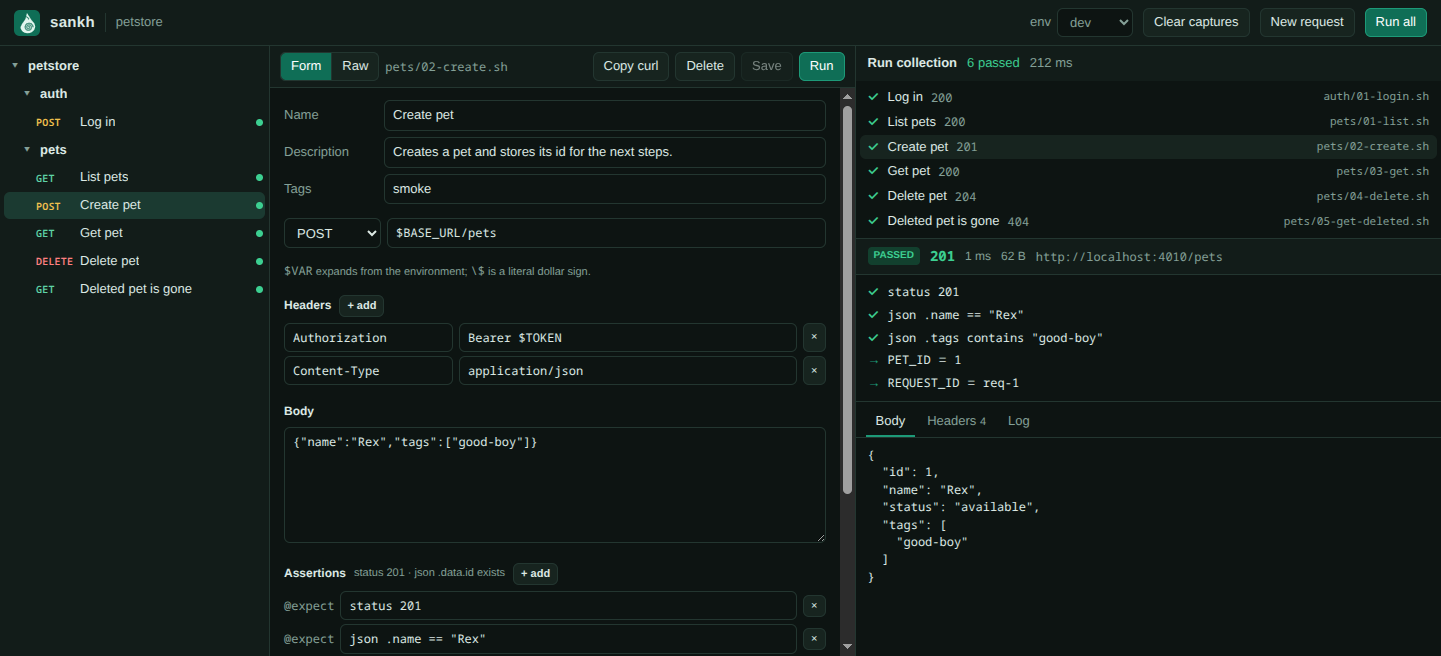
sankh serve examples/petstoreInstall with one line, run the smoke folder, publish a JUnit report. Exit codes tell your CI exactly what went wrong.
| Exit | Meaning |
|---|---|
| 0 | All requests passed |
| 1 | An assertion, capture, or request failed |
| 2 | Usage or configuration error |
| 3 | The collection is not trusted |
- run: curl -fsSL https://sankh.dev/install.sh | sh
- run: >-
    sankh run . --env ci --folder smoke
    --trust --report junit
  env:
TOKEN: ${{ secrets.API_TOKEN }}Request files are scripts, so a cloned collection never runs until you trust it. In a git repo trust is tied to the HEAD commit and lapses when it changes.
Values of variables named like TOKEN, SECRET, KEY or PASSWORD are replaced with *** in output, reports, and the UI.
The UI binds to 127.0.0.1 and rejects foreign hosts and cross-origin calls. Sankh
makes no network requests other than the ones in your files.
Sankh needs curl and a POSIX shell at run time. On Windows, use Git Bash or WSL.
curl -fsSL https://sankh.dev/install.sh | sh curl -fsSL https://sankh.dev/install.sh | SANKH_VERSION=0.1.1 sh brew install sankh-dev/tap/sankh powershell -c "irm https://github.com/sankh-dev/sankh/releases/latest/download/sankh-installer.ps1 | iex" sankh init my-api # scaffold a collection
sankh trust my-api # request files are scripts: trust before running
sankh run my-api --env dev # run everything, exit non-zero on failure
sankh serve my-api # web UI on http://localhost:4747